> For the complete documentation index, see [llms.txt](https://docs.bitnbox.com/llms.txt). Markdown versions of documentation pages are available by appending `.md` to page URLs; this page is available as [Markdown](https://docs.bitnbox.com/guides/webhooks-set-up.md).
# Webhooks Set Up
## Introduction
Webhooks allow you to receive real-time notifications about the statuses of your payments and payouts, such as successful completion, failure, or cancellation. These notifications are sent whenever there are changes in the status of your transactions.
## How to configure
There are two ways to set up a webhook URL:
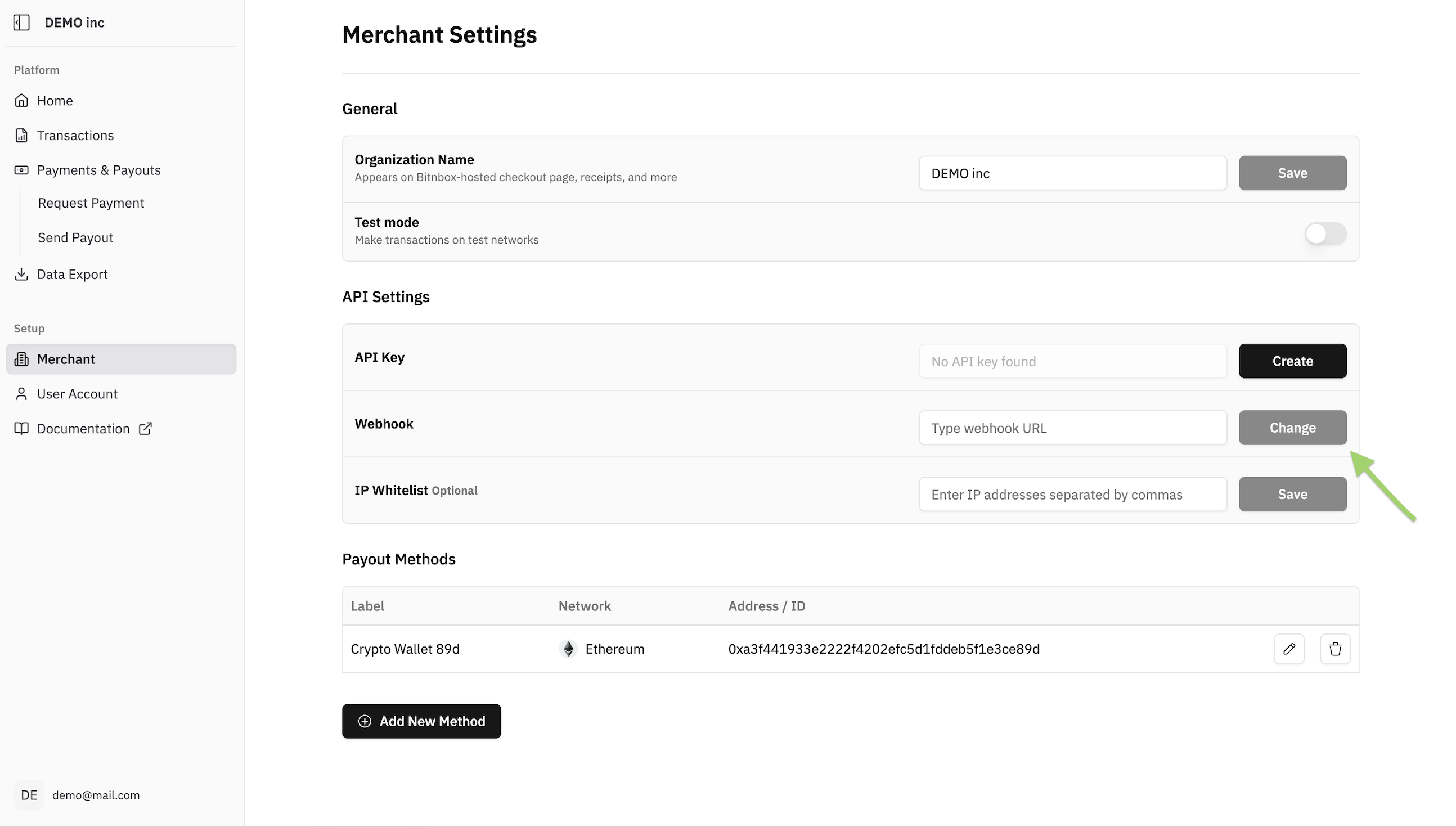
1. **Global webhook** — applies to all payments and payouts. Set it once in the dashboard:
Go to **Merchant Account → Settings → API Settings → Webhook → Enter URL → Change → Confirm**
**Per-transaction webhook** — specify a `webhookUrl` in the request body when creating an individual payment or payout. This overrides the global webhook for that transaction only. If no `webhookUrl` is provided and no global webhook is set, no notifications will be sent.
2. **Individual Webhook**
You can also specify a webhook URL for each individual payment or payout you create. This provides more granular control over notifications. If a webhook URL is not specified during payment/payout creation, the global webhook URL (if set) will be used.
Here's an example of how you can include the `webhookUrl` in the request body using curl for an individual payment:
```bash
curl --request POST \
--url https://api.bitnbox.com/v1/payment \
--header 'Content-Type: application/json' \
--header 'x-api-key: YOUR-API-KEY' \
--data '{
"amount": 1,
"method": "direct",
"platformFeeByUser": false,
"currency": "",
"network": "",
"customerId": "",
"customerIp": "",
"orderId": "",
"orderDescription": "",
"additionalData": "",
"webhookUrl": "https://example.com/webhook"
}'
```
#### Response
* HTTP status code is 200 (Required)
For each transaction, Bitnbox sends multiple webhooks in a predefined order corresponding to the transaction status changes. The next webhook is sent only after the previous one has been successfully delivered. A delivery is considered successful if your server responds with HTTP 200 status code.
If the response is a 4xx or 5xx code, Bitnbox retries the delivery. Up to 12 retries are performed, with each retry delayed exponentially: 2^retryCount minutes (for example, 2, 4, 8, 16, etc.). If all retry attempts fail, the webhook is marked as Canceled, and no further webhooks for this transaction are sent.
### Webhook payload
Bitnbox sends a JSON body with two top-level fields: `data` and `meta`.
#### `meta` object
| Field | Type | Description |
| ------------ | ------------- | -------------------------------------------------- |
| `event` | string | Event type. Example: `payment`, `payout` |
| `webhookId` | string (UUID) | Unique identifier of this webhook delivery |
| `merchantId` | string (UUID) | Your merchant account identifier |
| `testMode` | boolean | `true` if the transaction was created in Test Mode |
#### `data` object
Contains full transaction details. Fields match the response from the corresponding API endpoint.
| Field | Type | Description |
| --------------------- | ------------- | -------------------------------------------------------------- |
| `paymentId` | string (UUID) | Unique payment identifier |
| `orderId` | string | Your order ID |
| `status` | string | Current transaction status. See Transaction Statuses |
| `method` | string |
Payment method:
crypto
|
| `currency` | string | Currency ticker (e.g. `usdt`) |
| `network` | string | Network ticker (e.g. `tron`, `binancepay`) |
| `payAmount` | number | Amount the customer was asked to pay |
| `paidAmount` | number | Amount actually received. `null` until payment detected |
| `merchantAmount` | number | Amount credited to your balance after fee. `null` until `paid` |
| `paymentId` | string (UUID) | Unique payment identifier |
| `checkoutUrl` | string | Hosted checkout page URL |
| `customerId` | string | Your internal customer identifier |
| `customerIp` | string | Customer IP address |
| `processingFeeByUser` | boolean | Whether fee was charged to customer |
| `products` | array | Products array (for Binance Pay / KuCoin Pay) |
| `additionalData` | string | Custom string you passed at payment creation |
| `webhookUrl` | string | The webhook URL this notification was sent to |
| `createdAt` | datetime | Payment creation timestamp |
| `updatedAt` | datetime | Last update timestamp |
| `expiredAt` | datetime | Payment expiry timestamp |
| `condition` | string | Present when status is `on_hold`. Describes hold reason |
## Webhook Secret
Webhook signatures are generated using a dedicated secret, the `webhookSecret`. This is a separate entity: your API key controls access to the API, while the `webhookSecret` is used only to sign webhooks. This separation lets you have multiple API keys without affecting webhook signature verification.
By default, the `webhookSecret` value matches your current API key. If you regenerate the secret, it becomes independent, and you'll need to use the new value to verify signatures.
**Where to find and manage it**
Merchant Account → Settings → API Settings → Webhook Secret
Unlike the API key, the `webhookSecret` value can be viewed again at any time. When you regenerate the secret, an email notification is sent to your account.
**What this means for you**
If you are an existing merchant: your `webhookSecret` is already set and matches your current API key by default. If your code verifies signatures using the API key, it will keep working with no changes, and no action is required. You'll only need to update to the new value if you regenerate the secret yourself in settings. We recommend switching to the `webhookSecret` in your verification code so you can manage API keys independently of webhook signing going forward.
If you are a new merchant: use the `webhookSecret` from your settings as the key for verifying webhook signatures. Do not use the API key for this, as it is intended for API access only.
## How to Check Signature
To ensure the integrity and authenticity of the data received through webhooks, verify the `x-signature` in the headers against the request body using your `webhookSecret`.
Here's a breakdown of the verification process:
1. Retrieve the `x-signature` from the request headers.
2. Compute a signature using your `webhookSecret` and the request body. All fields from body in stringified JSON format.
3. Compare the computed signature with the `x-signature` from the headers.
The signing algorithm is HMAC-SHA256; the body format and the `x-signature` header have not changed. Only the source of the secret is different.
Example
```javascript
const crypto = require('crypto');
// Function to verify signature
function verifySignature(webhookSecret, requestBody, signatureHeader) {
// Compute the signature using the webhook secret and the request body
const computedSignature = crypto.createHmac('sha256', webhookSecret)
.update(requestBody)
.digest('hex');
// Compare the computed signature with the signature from the headers
return computedSignature === signatureHeader;
}
// Example data
const webhookSecret = 'YOUR-WEBHOOK-SECRET';
const body = {
data: { ... },
meta: { ... }
}; // Example body
const stringifiedBody = JSON.stringify(body);
const signatureHeader = 'a2b4f9c285e38d73eeb9d3c2b478d5e1'; // Example signature from headers
// Verify the signature
const isSignatureValid = verifySignature(webhookSecret, stringifiedBody, signatureHeader);
// Output result
console.log('Is signature valid?', isSignatureValid);
```
This process ensures that the data received is secure and has not been tampered with.
## Example
Example with real data (BinancePay)
{% code fullWidth="false" %}
```javascript
const crypto = require('crypto');
// Function to verify signature
function verifySignature(webhookSecret, requestBody, signatureHeader) {
// Compute the signature using the webhook secret and the request body
const computedSignature = crypto.createHmac('sha256', webhookSecret)
.update(requestBody)
.digest('hex');
// Compare the computed signature with the signature from the headers
return computedSignature === signatureHeader;
}
// Example data
const webhookSecret = '67f2c8b4-68e1-4019-ae07-83437681ee5e';
const body = {
"data": {
"orderId": "1234",
"status": "waiting",
"method": "binancepay",
"currency": "usdt",
"network": "binancepay",
"payAmount": "10",
"paidAmount": null,
"merchantAmount": null,
"paymentId": "a7d950b9-38d1-4e2a-9992-fa0d98fd0d6d",
"checkoutUrl": "https://pay.binance.com/en/checkout/811bf3c80f634f65b98e911f632e18b6",
"customerId": "id",
"customerIp": "ip",
"processingFeeByUser": false,
"products": [
{
"id": "11",
"name": "Product name",
"type": "02",
"description": "Product description"
}
],
"additionalData": "data",
"webhookUrl": "https://slimy-nurse-29.webhook.cool",
"createdAt": "2025-07-24T09:24:25.348Z",
"updatedAt": "2025-07-24T09:24:25.348Z",
"expiredAt": "2025-07-24T12:24:25.346Z"
},
"meta": {
"testMode": false,
"event": "payment",
"webhookId": "4d9f67c6-73c5-40fb-8f85-6fba37affcd3",
"merchantId": "ce7d802e-a14e-4d6b-8b39-9b57caef7756"
}
};
const requestBody = JSON.stringify(body);
const signatureHeader = '7904084e418625224c6c58ded69bfa382c526eb6d7043ed7d043b6d56de08b93'; // Example signature from headers
// Verify the signature
const isSignatureValid = verifySignature(webhookSecret, requestBody, signatureHeader);
// Output result
console.log('Is signature valid?', isSignatureValid);
```
{% endcode %}