> For the complete documentation index, see [llms.txt](https://docs.bitnbox.com/llms.txt). Markdown versions of documentation pages are available by appending `.md` to page URLs; this page is available as [Markdown](https://docs.bitnbox.com/guides/create-payment-and-make-payout-via-api-reference.md).
# Create payment & make payout via API Reference
Payment and payout creation via the API Reference is the fastest way to test the Bitnbox platform. Here's a guide on how to do that.
{% hint style="info" %}
You can find the currencies and network codes in the [API Glossary](https://docs.bitnbox.com/help-and-support/glossary.md).
{% endhint %}
{% hint style="info" %}
Make free transactions on test networks — [guide](https://docs.bitnbox.com/guides/test-mode.md).
{% endhint %}
## Payment
### **1. Create a payment**
1. Go to the [API Reference](https://docs.bitnbox.com/bitnbox-pay-api-reference/create-payment.md) page
2. Click on “Test it”
3. Insert your API Key in the “x-api-key” field
4. Fill in the required invoice properties
```json
{ // example
"amount": 123, // min 5.00
"method": "direct", // direct on-chain transfer
"customerId": "", // payer IP
"customerIp": "",// payer IP
"orderId": "",// any input
"orderDescription": "", // any input
"additionalData": "",// any input
"platformFeeByUser": false, // who pays the processing fee
"currency": "usdt", // we recommend using USDT for test payments
"network": "sepolia" // we recommend using Sepolia or Amoy for test payments
"webhookUrl": "", // URL for webhook
"cancelUrl": "", // URL to redirect to when payment is failed for Binance Pay, KuCoin Pay. must begin with HTTP. optional
"successUrl": "", // URL to redirect to when payment is success for KuCoin Pay. must begin with HTTP. optional
}
```
5. Click on “Send”
6. Get the payment address
```json
{ // example
"orderId": "1",
"status": "waiting",
"method": "direct",
"currency": "usdt",
"network": "sepolia",
"payAmount": 123,
"paymentId": "11bf97b6-9b27-1b21-9177-ec1e1581219c",
"checkoutUrl": "http://pay.bitnbox.com?paymentId=11bf97b6-9b27-1b21-9177-ec1e1581219c",
"payAddress": "0xaf38220a2f436bc6bd3b5a7cb67afc4dfb47f7ae",
"payQrCodeUri": "data:image/png;base64,iVBOR...ggg==",
"customerId": "1/213-3",
"customerIp": "10.70.43.129",
"processingFeeByUser": false,
"additionalData": "test",
"webhookUrl": "https://slimy-rainbow-62.webhook.cool",
"createdAt": "2025-03-20T14:27:24.155Z",
"updatedAt": "2025-06-30T14:27:24.155Z",
"expiredAt": "2025-06-30T20:27:24.154Z",
}
```
After this, you can send the crypto to the payment address.
### **2. Get payment status**
1. Go to the [API Reference](https://docs.bitnbox.io/api-reference/payment) page
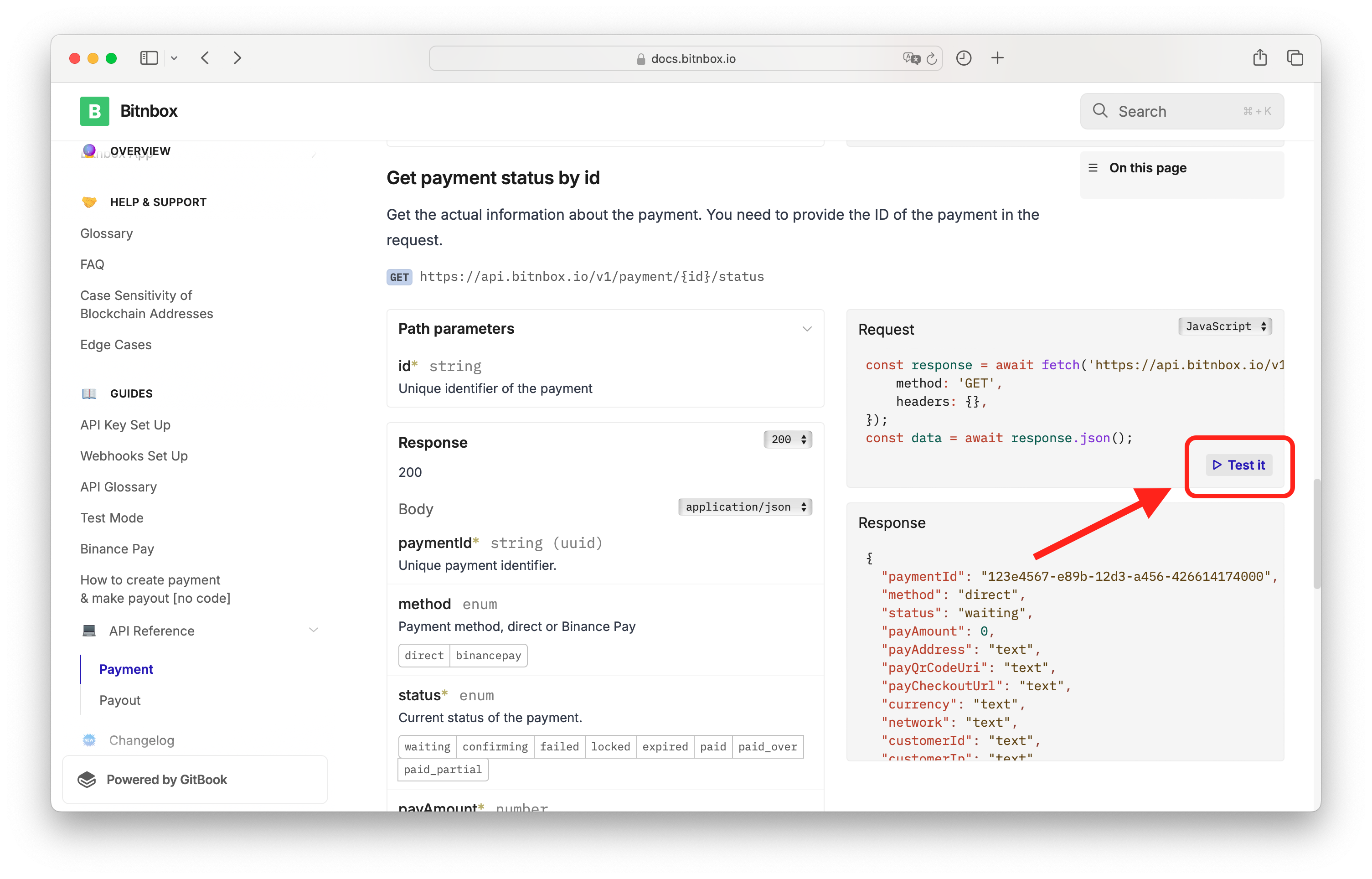
2. Scroll down to the “Get payment status by ID” section
3. Click on the “Test it” button
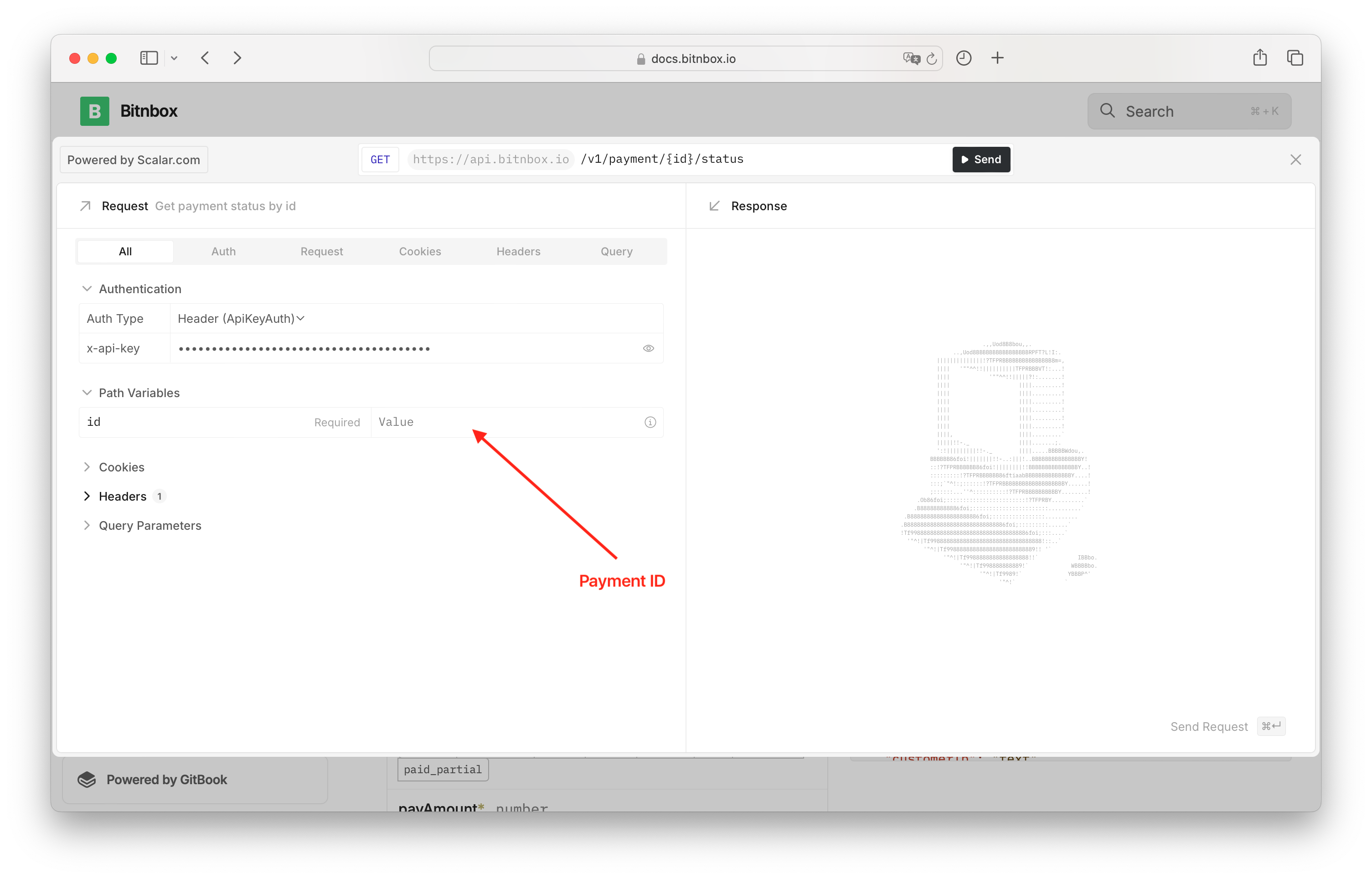
4. Insert your API Key in the “x-api-key” field
5. Type the payment ID
6. Click on “Send”
7. Get the payment status
Also, you can see the payment status on the Transaction History page in the web app.
## Payout
### **1.1. Create a payout via API**
1. Go to the [API Reference](#id-1.1.-create-a-payout-via-api) page
2. Click on “Test it”
3. Insert your API Key in the “x-api-key” field
4. Fill in the required payout properties
```json
{
"method": "direct" or "binancePay"
"amount": 50
"currency": "usdt", // any available currency
"orderId": "",// any input
"customerId": ""
"customerIp": ""
"networkFeeByUser": false
"network": "sepolia"
"walletAddress": "" // recipient's wallet address
}
```
5. Click on “Send”
6. You will also see the payout status in the app
### **1.2. Create a payout via the App**
1. Go to the payout page - New Payout
2. Fill out the required properties
3. Click on "Transfer"
### **2. Get payout status**
1. Go to the [API Reference](https://docs.bitnbox.com/bitnbox-pay-api-reference/get-payout-status.md) page
2. Scroll down
3. Click on the “Test it” button
4. Insert your API Key in the “x-api-key” field
5. Type the payout ID
6. Click on “Send”
7. Get the payout status
Also, you can see the payout status on the Transaction History page in the web app.