> For the complete documentation index, see [llms.txt](https://docs.bitnbox.com/llms.txt). Markdown versions of documentation pages are available by appending `.md` to page URLs; this page is available as [Markdown](https://docs.bitnbox.com/guides/api-key-set-up.md).
# API Key Set Up
## Introduction
Your API key is the credential used to authenticate all requests to the Bitnbox API. It is also used to verify webhook signatures — see Webhooks Set Up for details.
API keys are essential for secure access to our API, ensuring both authentication and access control. When used for webhook signatures, API keys also validate the integrity of the data transmitted. By using API keys for webhook signatures, the system verifies the source and integrity of incoming data, guaranteeing it originates from a trusted sender and preventing tampering during transit.
## Generating an API Key
**Requirements:** 2FA (Google Authenticator) must be enabled on your account before you can generate a key.
**Steps:**
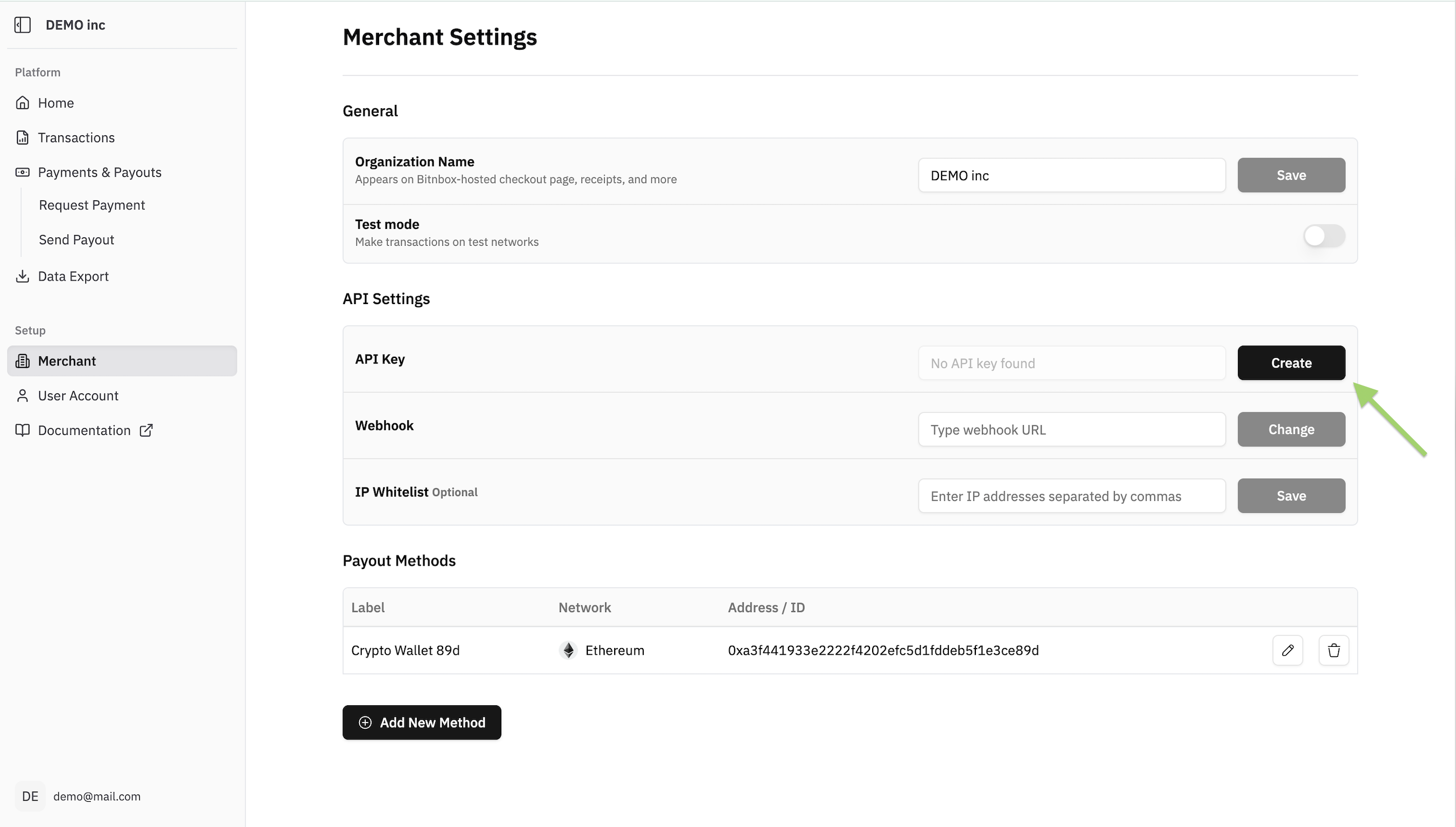
1. Go to **Merchant Account → Settings → API Settings → API Key**
2. Click **Create**
3. Confirm with your Google Authenticator code
4. **Copy the key immediately** — it will not be shown again
{% hint style="danger" %}
**Important:** Store your API key in a password manager. If you lose it, you will need to generate a new one — which will immediately invalidate the current key and break all active integrations.
{% endhint %}
## How to Use API Key
Including the `x-api-key` header in your requests is essential to authenticate your access and ensure secure communication with the API.
Here's how you can include the `x-api-key` header in a POST request using curl:
```bash
curl --request POST \
--url https://api.bitnbox.com/v1/payment \
--header 'Content-Type: application/json' \
--header 'x-api-key: YOUR-API-KEY' \
--data '{
"amount": 1,
"method": "direct",
"platformFeeByUser": false,
"currency": "",
"network": "",
"customerId": "",
"customerIp": "",
"orderId": "",
"orderDescription": ""
"additionalData": "",
"webhookUrl": ""
}'
```
## Security recommendations
| Recommendation | Why |
| ------------------------------------------------- | ------------------------------------------------------------------------- |
| Store the key in a password manager | Prevents accidental exposure in code or logs |
| Never hardcode the key in frontend or mobile code | Client-side code is publicly readable |
| Use environment variables in your backend | Keeps the key out of version control |
| Restrict API access by IP | Use the IP Whitelist in Settings to limit which servers can make requests |
| Rotate the key periodically | Limits the impact of a potential leak |
For detailed information on utilizing API keys in webhooks, please refer to the guide: [Setting Up Webhooks](https://docs.bitnbox.com/guides/webhooks-set-up.md).